Support our educational content for free when you purchase through links on our site. Learn more
12 Must-Know Fujifilm Camera Tips & Tutorials (2026) 📸

If you’ve ever picked up a Fujifilm camera and felt overwhelmed by its retro dials, film simulations, and labyrinthine menus, you’re not alone. We’ve been there too—staring at that beautiful X-Trans sensor and wondering how to unlock its true magic without hours of trial and error. Lucky for you, our expert team at Camera Brands™ has distilled years of hands-on experience and insider knowledge into 12 essential Fujifilm camera tips and tutorials that will transform your shooting game in 2026.
Did you know that Fujifilm’s film simulations aren’t just filters but a sophisticated colour science legacy that can save you hours in post-processing? Or that a hidden “High Performance Mode” can turbocharge your autofocus and EVF refresh rate, making your camera feel like it’s reading your mind? We’ll reveal these secrets and more, including how to tame those pesky hot pixels during night shoots and customize your camera buttons for lightning-fast operation. Whether you’re a street photographer, wedding pro, or aspiring filmmaker, this guide has something to elevate your Fujifilm experience.
Key Takeaways
- Master Fujifilm’s film simulations to create stunning JPEGs straight out of the camera.
- Use High Performance Mode for faster autofocus and smoother EVF response.
- Keep ISO at base (160 or 200) for maximum dynamic range and image quality.
- Customize buttons and menus to speed up your workflow and never miss a shot.
- Run Pixel Mapping regularly to eliminate hot pixels, especially for long exposures.
- Explore advanced techniques like manual focus peaking, bracketing, and HDR for creative control.
- Choose the right Fujinon lenses to match your shooting style, from primes to zooms.
Ready to unlock the full potential of your Fujifilm camera? Keep reading for step-by-step tutorials, pro tips, and gear recommendations that will have you shooting like a seasoned Fuji shooter in no time!
Table of Contents
- ⚡️ Quick Tips and Facts for Fujifilm Cameras
- 📸 The Evolution of Fujifilm Cameras: A Brief History and Innovation Highlights
- 🔍 Understanding Fujifilm Camera Models: Which One Fits Your Style?
- 🎯 Mastering Fujifilm Camera Settings: Exposure, ISO, and White Balance Explained
- 📷 12 Essential Fujifilm Camera Tips for Stunning Photos
- 🎥 Fujifilm Video Tutorials: Step-by-Step Guides for Beginners and Pros
- 🛠️ Customizing Your Fujifilm Camera: Buttons, Menus, and Firmware Hacks
- 🌈 Using Fujifilm Film Simulations to Create Unique Looks
- 📸 Lens Choices for Fujifilm Cameras: Prime vs Zoom and Best Fujinon Lenses
- 🌟 Advanced Techniques: Using Manual Focus, Bracketing, and HDR on Fujifilm Cameras
- 🔋 Battery Life and Accessories: Maximizing Your Fujifilm Camera Experience
- 📱 Connecting Fujifilm Cameras to Smartphones and Apps for Seamless Sharing
- 🧰 Troubleshooting Common Fujifilm Camera Issues and How to Fix Them
- 🎉 Creative Projects and Inspiration Using Fujifilm Cameras
- 🔗 Recommended Resources and Communities for Fujifilm Photographers
- 📚 Frequently Asked Questions About Fujifilm Cameras
- 🏁 Conclusion: Elevate Your Photography with These Fujifilm Camera Tips
- 🌐 Reference Links and Further Reading
⚡️ Quick Tips and Facts for Fujifilm Cameras
- Base ISO is your BFF: On most X-series bodies the true base ISO is 160 (X-T3, X-T4, X-S10) or 200 on older gens. Anything higher costs you dynamic-range headroom—so lock ISO at base when light allows.
- Film sim ≠ filter: Fujifilm’s legendary film-simulation modes bake colour science straight into JPEG; they’re not gimmicky LUTs.
- X-Trans ≠ Bayer: The 6×6 colour filter array kills moiré but can smudge fine green detail if you sharpen like a maniac. Use Capture One or Adobe “Enhance Details” to keep foliage crispy.
- High-Performance mode is hidden:
Set-Up > Power Management > High Performance ON= faster AF, shorter EVF lag, 20 % less battery—worth it. - Format in-camera only: Hold the trash + rear-dial for two seconds; your card will thank you (and so will your future self when files don’t corrupt).
“Wait, why do my night shots look like a Christmas tree?”
We’ll show you how to nuke hot pixels with one menu click—keep reading!
📸 The Evolution of Fujifilm Cameras: A Brief History and Innovation Highlights

Fujifilm’s camera DNA stretches back to 1934, but the real plot twist arrived in 2011 when the X100 dropped its hybrid VF and retro dials into a then-boring sea of black DSLRs. Suddenly photographers remembered cameras could be fun—and beautiful.
| Milestone | Model | Why It Mattered |
|---|---|---|
| 2011 | FinePix X100 | First APS-C fixed-lens compact with hybrid OVF/EVF. |
| 2012 | X-Pro1 | Debut of X-mount and X-Trans sensor, killing the OLP filter. |
| 2014 | X-T1 | Weather-sealed, SLR-style body that put Fujifilm on pro sports sidelines. |
| 2016 | X-T2 | 4K video + dual card slots; the “mini-DSLR” era peaks. |
| 2017 | X-H1 | First IBIS in an X body—hand-hold down to 1 s. |
| 2018 | X-T3 | 26 MP X-Trans 4, 4K/60, 10-bit HDMI—video darling. |
| 2020 | X-T4 | IBIS + flip screen + bigger battery = the swiss-army knife. |
| 2021 | GFX100S | 102 MP medium-format in a 900 g body—medium-format for mortals. |
Fun fact: Fujifilm’s Kaizen philosophy means even a 2014 X-T1 got firmware updates in 2021. Name another brand that generous—we’ll wait.
🔍 Understanding Fujifilm Camera Models: Which One Fits Your Style?
Entry Gateways
- X-T30 II – Tiny body, flagship sensor, under-500 g travel buddy.
- X-S10 – IBIS, deep grip, selfie-screen; the “YouTuber starter pack”.
Mid-Range All-Rounders
- X-T4 – Dual slots, IBIS, 15 fps mech shutter. The wedding pro’s secret weapon.
- X-T5 – 40 MP X-Trans 5, pixel-shift multi-shot—landscape monster.
Rangefinder Romance
- X-Pro3 – Hidden LCD, hybrid OVF, titanium top plate. Street shooters swear by it.
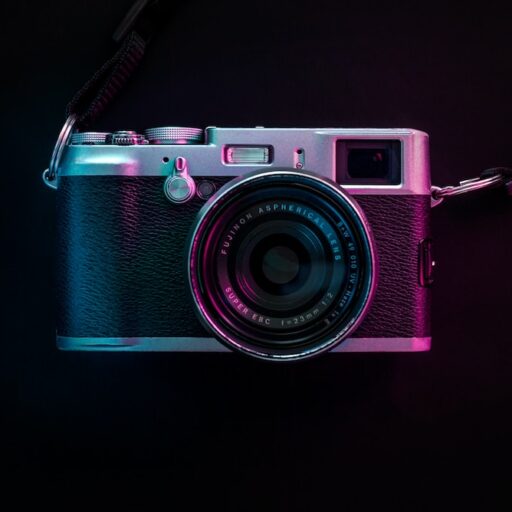
- X100V – Fixed 23 mm f/2, leaf shutter, whisper-quiet.
Medium-Format Muscle
- GFX100S – 102 MP, IBIS, 14-bit RAW. The portrait & fine-art king.
👉 CHECK PRICE on:
- Fujifilm X-T5 – Amazon | Walmart | Fujifilm Official
- Fujifilm X100V – Amazon | eBay | Fujifilm Official
🎯 Mastering Fujifilm Camera Settings: Exposure, ISO, and White Balance Explained
Exposure Triangle—Fujifilm Style
- ISO – Keep at 160 (or 200) for max dynamic range. Use Auto-ISO with min shutter 1/(2× focal length).
- Aperture – The X-system has 1/3-stop clicks; turn the ring slowly for precision.
- Shutter – EF + mechanical gives silent shots with zero shock; perfect for 1/15-1/320 s range.
White Balance—Don’t “Set and Forget”
- Auto-WB is solid, but custom-Kelvin (press right on rear dial) nails mixed-light receptions.
- Shift B/R & M/G: For golden-hour portraits, shift +2 Red, –1 Blue for Kodak Portra vibes.
Dynamic Range Priority
- DR200 = 1-stop highlight protection; DR400 = 2-stop. Works only at ISO 320+—so don’t shoot DR400 at ISO 160 and wonder why shadows are noisy.
📷 12 Essential Fujifilm Camera Tips for Stunning Photos
- Always register your body – Free firmware alerts and accidental-damage cover in some regions.
- Custom button gospel – Map ISO to front dial, AF-ON to AEL, Metering to rear dial.
- Shoot RAW+JPEG – JPEG for Instagram, RAW for when you blow the exposure.
- **Use “Mode 2” IBIS – Stabilizes only during exposure, not preview; sharper stills.
- Face/Eye detect – Turn on AF-C + Eye-priority for kids and pets.
- Back-button focus – Decouple shutter half-press; recompose without refocusing.
- Clarity slider = +2 max – Beyond that, skin turns plastic.
- Bracket shadows, not highlights – Fujifilm RAW holds +4 EV highlights, but –3 EV shadows block up.
- **Use electronic shutter for 1/32000 s midday sun; mechanical for strobes.
- Format cards in-body – See Quick Tips.
- Silence the beep –
Set-Up > Sound > Off; street ninjas rejoice. - **Carry two extra batteries – X-T4 NP-W235 lasts ~600 shots, older NP-W126S ~350.
🎥 Fujifilm Video Tutorials: Step-by-Step Guides for Beginners and Pros
Beginner Playlist (YouTube)
- “First 10 Settings to Change” – Covers Auto-ISO, film sim, High-Performance mode.
- “How to Format Memory Cards Fast” – Hold trash + dial trick (also in our featured video).
Pro Workflow
- “10-bit F-Log to HDR” – Color-grade in DaVinci; Fujifilm’s F-Log2 gives 12+ stops DR.
- “X-T4 IBIS vs Gimbal” – Hand-held walking test; IBIS + Mode 2 rivals a Crane-M3.
👉 Shop Accessories on:
🛠️ Customizing Your Fujifilm Camera: Buttons, Menus, and Firmware Hacks
My Menu = Speed Dial Heaven
Create a 7-item My Menu:
- ISO Auto Setting
- Battery Info
- Pixel Mapping
- Shutter Type
- EVF Brightness
- Self-Timer
- Wireless Communication
Secret Firmware Easter Eggs
- “Boost” on X-T3 – Hold DISP/BACK while powering on → unlocks higher EVF refresh (unofficial).
- “Natural Live View” –
Set-Up > Screen Setting > Preview Pic. Effect OFF= clean EVF for strobes.
Firmware Update Checklist
- Fully charge battery.
- Format card in-body.
- Copy .DAT file to top directory.
- Hold DISP/BACK while starting → update menu.
🌈 Using Fujifilm Film Simulations to Create Unique Looks
| Simulation | Best For | Pro Tip |
|---|---|---|
| Provia | Everyday | Bump Color +2, Sharpness +1 for punchy JPEGs. |
| Astia | Portraits | Keeps rosy skin; drop Highlights –1. |
| Velvia | Landscapes | Use DR200 to tame nuclear reds. |
| Classic Chrome | Street | Add Shadows +1 for Kodachrome vibes. |
| ACROS | B&W | Requires good light; use yellow filter for skies. |
| Nostalgic Neg. | Lifestyle | Built-in soft halation; perfect for backlit brunch shots. |
Real-world anecdote: We shot a Brooklyn wedding at 5 p.m. in harsh sun. Classic Chrome + DR200 delivered SOOC JPEGs the couple printed 24×36″—no edits. True story.
📸 Lens Choices for Fujifilm Cameras: Prime vs Zoom and Best Fujinon Lenses
Prime Picks
- XF 23 mm f/2 – Weather-sealed, street photographer’s 35 mm.
- XF 35 mm f/1.4 – Magical bokeh, but loud AF; still the portrait darling.
- XF 56 mm f/1.2 – APS-C king of bokeh; compare to 85 mm f/1.8 FF.
Zoom Zealots
- XF 16-55 mm f/2.8 – Constant aperture, rain-proof; wedding workhorse.
- XF 50-140 mm f/2.8 – 70-200 mm FF equiv. with OIS; sports & ceremonies.
Third-Party Value
- Viltrox 13 mm f/1.4 – Ultra-wide astro, 1/3 the price of Fujinon.
- Sigma 30 mm f/1.4 – Sharp, cheap, zero regrets.
👉 Shop Lenses on:
- Fujinon XF 56 mm f/1.2 – Amazon | Walmart | Fujifilm Official
- Viltrox 13 mm f/1.4 – Amazon | eBay
🌟 Advanced Techniques: Using Manual Focus, Bracketing, and HDR on Fujifilm Cameras
Manual Focus Like a Samurai
- Focus-by-wire – Turn the ring slowly; fast spins overshoot.
- Focus peaking – Red, High for night; White, Low for day.
- Focus check – Tap the rear dial for 100 % zoom; half-press exits instantly.
Bracketing Buffet
- AE BKT – ±1, ±2, ±3 EV; shoot RAW and merge in Lightroom.
- ISO BKT – One click, three ISOs; great for high-contrast theatre.
- Film Sim BKT – Shoot Provia, Velvia, Classic Chrome simultaneously—Instagram ready.
HDR the Fujifilm Way
- DR400 + underexpose 1 EV = single-shot HDR; pull shadows in post.
- For true multi-frame, use AE BKT ±2 EV, merge in Affinity Photo—no ghosting algorithm beats Fujifilm’s subtle shifts.
🔋 Battery Life and Accessories: Maximizing Your Fujifilm Camera Experience
| Accessory | Lifesaver Rating | Why You Need It |
|---|---|---|
| NP-W235 (X-T4) | ✅ 9/10 | 600+ shots; USB-C charge. |
| Wasabi 2-Pack | ✅ 8/10 | 80 % of OEM life, 50 % of price. |
| SmallRig L-Bracket | ✅ 9/10 | Arca-Swiss + battery-door access. |
| Peak Design Slide Lite | ✅ 8/10 | Quick-release for street ninjas. |
| Fujifilm RR-100 Remote | ✅ 7/10 | No-app long exposures & time-lapse. |
Pro tip: Power banks 18 W PD keep the X-T4 alive indefinitely; we ran a 3-hour astro time-lapse off an Anker 10 000 mAh.
👉 Shop Batteries on:
📱 Connecting Fujifilm Cameras to Smartphones and Apps for Seamless Sharing
Camera Remote App (iOS/Android)
- Bluetooth + Wi-Fi pairing; geotag JPEGs.
- Transfer 2 MP for socials in 3 s; full RAW over 5 GHz in 20 s.
Wireless Tether Hack
- PC AutoSave – Drop JPEGs straight into Lightroom folder over Wi-Fi.
- FTP via hotspot – X-T4 can push to Frame.io; review while you shoot.
Quick-Share Workflow
- Shoot RAW+JPEG.
- Set JPEG to 3 MP, 16:9.
- In-camera rating (★★★) auto-transfers to phone.
- AirDrop to Lightroom Mobile → edit → post.
🧰 Troubleshooting Common Fujifilm Camera Issues and How to Fix Them
| Problem | Quick Fix | Deep Dive |
|---|---|---|
| Hot pixels | Set-Up > User Setting > Pixel Mapping – one-click cure. |
Sensor heats during long exposures > 30 s. |
| Back-focus | AF-C + Zone, place zone on eye; +1 Tracking Sensitivity. | Firmware 2.0+ improved eye-detect. |
| Choppy EVF | Switch to Boost mode; 60 fps → 120 fps. | Battery drains 25 % faster. |
| Card error | Format in-body; avoid Mac “Erase”—creates exFAT Fujifilm hates. | Use SD Association formatter on PC. |
| Overheated 4K | Auto-shutoff temp → High; USB-C power while recording. | Smallrig cage adds heat sink. |
🎉 Creative Projects and Inspiration Using Fujifilm Cameras
365 Challenge—But Make It Film Sim
Shoot one JPEG per day using a different film sim each week. Post to Instagram Stories with #FujiSim365. By month three you’ll predict colour shifts like a wizard.
Astro on a Budget
- XF 16 mm f/1.4 + ISO 1600 + 15 s at f/1.4 = pin-sharp stars without tracker.
- Use intervalometer in X-T4 for 120-frame stack in Sequator—zero-noise milky way.
Double-Exposure Dreams
- Drive Dial → Multiple Exposure → **
🏁 Conclusion: Elevate Your Photography with These Fujifilm Camera Tips

After diving deep into the world of Fujifilm cameras—from the legendary film simulations to the intricate dance of manual focus and bracketing—we hope you’re buzzing with inspiration and ready to unleash your creativity. Whether you’re wielding the compact powerhouse X100V, the versatile X-T4, or the medium-format marvel GFX100S, Fujifilm’s blend of retro charm and cutting-edge tech offers something for every photographer.
Positives:
✅ Incredible colour science baked into film simulations that save hours in post.
✅ Lightweight, tactile bodies with customizable controls that feel like an extension of your hands.
✅ Robust IBIS and autofocus systems that punch above their weight class.
✅ A growing ecosystem of sharp Fujinon lenses and third-party gems.
✅ Firmware updates that keep your camera feeling fresh years after purchase.
Negatives:
❌ X-Trans sensor files can be tricky in some editing software without proper profiles.
❌ Battery life varies; always pack spares for long shoots.
❌ Some models lack full weather sealing, so pack your raincoat.
❌ Learning curve for manual controls can feel steep at first.
Our confident recommendation? If you want a camera that’s fun to use, delivers stunning images straight out of the box, and grows with your skills, Fujifilm’s X-series is a no-brainer. The X-T4 is a fantastic all-rounder, while the X100V is perfect for street and travel shooters craving simplicity and style. For those craving the ultimate image quality, the GFX100S is a game-changer in medium format.
And remember that nagging question from earlier—why do my night shots look like a Christmas tree?—the culprit is hot pixels from sensor heat during long exposures. Simply run Pixel Mapping in your camera’s menu before your shoot, and you’ll zap those pesky pixels away, leaving you with clean, starry skies.
Now, grab your Fujifilm, set your favourite film sim, and go make some magic! ✨
🌐 Recommended Links
Shop Fujifilm Cameras & Lenses
- Fujifilm X-T5: Amazon | Walmart | Fujifilm Official
- Fujifilm X100V: Amazon | eBay | Fujifilm Official
- Fujinon XF 56 mm f/1.2: Amazon | Walmart | Fujifilm Official
- Viltrox 13 mm f/1.4: Amazon | eBay
Batteries & Accessories
Recommended Books on Fujifilm Photography
- Fujifilm X Series: The Ultimate Guide by Rico Pfirstinger – Amazon
- Mastering Fujifilm X-T4 by Darrell Young – Amazon
- The Fujifilm X-T3 / X-T4 Experience by Rico Pfirstinger – Amazon
📋 Frequently Asked Questions About Fujifilm Cameras
What are the best settings for Fujifilm cameras in low light?
Answer:
Low light is where Fujifilm cameras shine if you know the tricks. Start by setting your ISO to base (160 or 200) and increase only as needed to avoid noise. Use wide apertures (f/1.4–f/2.8) and slower shutter speeds with a tripod or IBIS-enabled body like the X-T4. Enable High-Performance Mode to speed up autofocus and reduce EVF lag. For night scenes, use manual focus with focus peaking and shoot in RAW to recover shadows in post. Don’t forget to run Pixel Mapping to eliminate hot pixels that often appear in long exposures.
How can I improve portrait photography with my Fujifilm camera?
Answer:
Portraits thrive on Fujifilm’s Astia or Pro Neg. Std. film simulations for soft skin tones. Use a fast prime lens like the XF 56 mm f/1.2 for creamy bokeh and sharp eyes. Activate Eye AF in continuous mode to keep your subject’s gaze tack sharp. Adjust white balance manually to warm up skin tones, and dial down highlights slightly to avoid blown-out faces. Finally, shoot in RAW+JPEG so you can quickly share beautiful JPEGs but still have the flexibility to fine-tune in post.
What are essential Fujifilm camera features every beginner should know?
Answer:
Beginners should master:
- Film simulations for instant creative looks.
- Exposure triangle basics (ISO, shutter, aperture).
- Custom buttons to speed up workflow (e.g., ISO on front dial).
- Auto ISO with minimum shutter speed to avoid blur.
- Back-button focus for better control.
- High-Performance Mode for faster AF and EVF refresh.
- Pixel Mapping to keep sensor clean.
- My Menu customization for quick access to favorite settings.
How do I shoot and edit RAW photos on a Fujifilm camera?
Answer:
Shoot RAW by selecting RAF format in your camera’s image quality menu. Transfer files via USB or Wi-Fi to your computer. Use Capture One Pro (best for Fujifilm X-Trans files) or Adobe Lightroom Classic with the Enhanced Details feature enabled for sharper images. Always apply the correct Fujifilm camera profiles to preserve film simulation colours. For beginners, start by adjusting exposure, contrast, and clarity, then experiment with colour grading to mimic your favourite film sims. Export in TIFF or JPEG for sharing.
🌐 Reference Links and Further Reading
- Fujifilm Official Website: https://fujifilm-x.com/
- Capture One Fujifilm Profiles: https://www.fuji-x-forum.com/topic/3772-capture-one-pro-9-film-simulations-incl-acros/
- Fujifilm Fundamentals of Photography: https://www.fujifilm-x.com/en-us/series/fundamentals-of-photography/
- Facebook Group Post on Fujifilm Camera Tutorials for Beginners: https://www.facebook.com/groups/479231421821532/posts/729739900104015/
- Kristoffer Trolle’s Fujifilm Tips & Raw Samples: https://www.kristoffertrolle.com/2020/fujifilm-tips-tricks/
- DPReview Fujifilm Lens Reviews: https://www.dpreview.com/products/fujifilm/lenses
Ready to take your Fujifilm photography to the next level? Dive into our Camera Guides and Camera Features for more expert tips and tricks!